Instruments · Sample libraries · Plugins
Chord Guide — REAPER assistant
Chord Guide — REAPER assistant
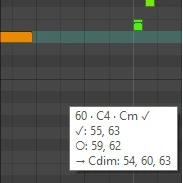
Harmony hints directly under the cursor in the MIDI editor: the current chord, whether a note belongs to the chord or scale, nearby notes and the next chord. Helps with melody writing without modifying MIDI or the project. Chords are read from the Chords track; the scale comes from the MIDI take settings or Composition Planner. Glue looped MIDI items first or disable Loop source; note processing inside FX is not analysed.
Requires REAPER and SWS Extension. Extract the archive and load Chord Guide.lua via Actions → New action → Load ReaScript in the main action list. Create a MIDI track named Chords containing the chords. Assign the script to a toolbar button: press once to enable hints and again to disable them. Detailed instructions are in the archive.
Version 1.0